Reverse Level Order Traversal of Binary Tree in Java
Print reverse level order traversal of binary tree. Let us first understand what we want to achieve? what is the input and what will be the expected output?


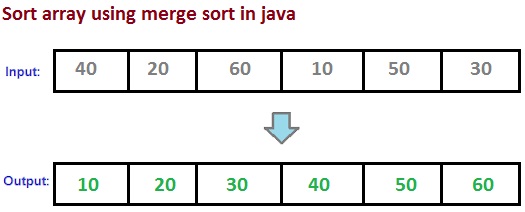 |
| Sort array using merge sort in java |
 |
| Merge sort algorithm with example |
package com.javabypatel;

public class MergeSort {

    public static void main(String[] args) {
        int arr[] = {10, 1, -2, 8, 9, 10, 1};

        //Before sort
        print(arr);

        mergeSort(arr, 0, arr.length - 1);

        //After sort
        print(arr);
    }

    static void mergeSort(int arr[], int start, int end) {
        if (start >= end)
            return;

        int mid = start + (end - start) / 2;
        mergeSort(arr, start, mid);
        mergeSort(arr, mid + 1, end);
        merge(arr, start, mid, end);
    }

    static void merge(int[] arr, int start, int mid, int end) {
        int i = start;
        int j = mid + 1;
        int counter = 0;

        int[] tempArr = new int[(end - start) + 1];

        while (i <= mid && j <= end) {
            if (arr[j] < arr[i]) {
                tempArr[counter] = arr[j];
                j++;
            } else {
                tempArr[counter] = arr[i];
                i++;
            }
            counter++;
        }
        while (i <= mid) {
            tempArr[counter] = arr[i];
            i++;
            counter++;
        }

        while (j <= end) {
            tempArr[counter] = arr[j];
            j++;
            counter++;
        }

        for (int k = 0; k < counter; k++) {
            arr[start + k] = tempArr[k];
        }
    }

    static void print(int arr[]) {
        for (int i = 0; i < arr.length; i++) {
            System.out.print(arr[i] + " ");
        }
        System.out.println();
    }
}


package com.javabypatel;

class TempStudent {
    public String name;
    public int age;
    public Address address;
    public List<MobileNumber> mobileNumbers;

    public TempStudent(String name, int age, Address address, List<MobileNumber> mobileNumbers) {
        this.name = name;
        this.age = age;
        this.address = address;
        this.mobileNumbers = mobileNumbers;
    }
}

class Student{
    private String name;
    private int age;
    private Address address;
    private List<MobileNumber> mobileNumbers;

    public Student(String name, int age, Address address, List<MobileNumber> mobileNumbers) {
        this.name = name;
        this.age = age;
        this.address = address;
        this.mobileNumbers = mobileNumbers;
    }

    public String getName() {
        return name;
    }

    public int getAge() {
        return age;
    }

    public Address getAddress() {
        return address;
    }

    public List<MobileNumber> getMobileNumbers() {
        return mobileNumbers;
    }

    public void setName(String name) {
        this.name = name;
    }

    public void setAge(int age) {
        this.age = age;
    }

    public void setAddress(Address address) {
        this.address = address;
    }

    public void setMobileNumbers(List<MobileNumber> mobileNumbers) {
        this.mobileNumbers = mobileNumbers;
    }

    @Override
    public String toString() {
        return "Student{" +
            "name='" + name + '\'' +
            ", age=" + age +
            ", address=" + address +
            ", mobileNumbers=" + mobileNumbers +
            '}';
    }
}

class Address{
    private String zipcode;

    public Address(String zipcode) {
        this.zipcode = zipcode;
    }

    public String getZipcode() {
        return zipcode;
    }

    public void setZipcode(String zipcode) {
        this.zipcode = zipcode;
    }
}

class MobileNumber{
    private String number;

    public MobileNumber(String number) {
        this.number = number;
    }

    public String getNumber() {
        return number;
    }

    public void setNumber(String number) {
        this.number = number;
    }
}
Solutionpackage com.javabypatel;
import java.util.Arrays;
import java.util.Comparator;
import java.util.List;
import java.util.Objects;
import java.util.Optional;
import java.util.stream.Collectors;
import java.util.stream.Stream;
public class StreamTest {
public static void main(String[] args) {
Student student1 = new Student(
"Jayesh",
20,
new Address("1234"),
Arrays.asList(new MobileNumber("1233"), new MobileNumber("1234")));
Student student2 = new Student(
"Khyati",
20,
new Address("1235"),
Arrays.asList(new MobileNumber("1111"), new MobileNumber("3333"), new MobileNumber("1233")));
Student student3 = new Student(
"Jason",
20,
new Address("1236"),
Arrays.asList(new MobileNumber("3333"), new MobileNumber("4444")));
List<Student> students = Arrays.asList(student1, student2, student3);
/*****************************************************
Get student with exact match name "jayesh"
*****************************************************/
Optional<Student> stud = students.stream()
.filter(student -> student.getName().equals("Jayesh"))
.findFirst();
System.out.println(stud.isPresent() ? stud.get().getName() : "No student found");
System.out.println("--------------------");
/*****************************************************
Get student with matching address "1235"
*****************************************************/
Optional<Student> stud1 = students.stream()
.filter(student -> student.getAddress().getZipcode().equals("1235"))
.findFirst();
System.out.println(stud1.isPresent() ? stud1.get().getName() : "No student found");
System.out.println("--------------------");
/*****************************************************
Get all student having mobile numbers 3333.
*****************************************************/
List<Student> stud2 = students.stream()
.filter(student111 -> student111.getMobileNumbers().stream().anyMatch(x -> Objects.equals(x.getNumber(), "3333")))
.collect(Collectors.toList());
String result1 = stud2.stream().map(std -> std.getName()).collect(Collectors.joining(",", "[", "]"));
System.out.println(result1);
System.out.println("--------------------");
/*****************************************************
Get all student having mobile number 1233 and 1234
*****************************************************/
List<Student> stud3 = students.stream()
.filter(student -> student.getMobileNumbers().stream().allMatch(x -> Objects.equals(x.getNumber(), "1233") || Objects.equals(x.getNumber(), "1234")))
.collect(Collectors.toList());
String result4 = stud3.stream().map(std -> std.getName()).collect(Collectors.joining(",", "[", "]"));
System.out.println(result4);
System.out.println("--------------------");
/*****************************************************
Create a List<Student> from the List<TempStudent>
*****************************************************/
TempStudent tmpStud1 = new TempStudent(
"Jayesh1",
201,
new Address("12341"),
Arrays.asList(new MobileNumber("12331"), new MobileNumber("12341")));
TempStudent tmpStud2 = new TempStudent(
"Khyati1",
202,
new Address("12351"),
Arrays.asList(new MobileNumber("11111"), new MobileNumber("33331"), new MobileNumber("12331")));
List<TempStudent> tmpStudents = Arrays.asList(tmpStud1, tmpStud2);
List<Student> studentList = tmpStudents.stream()
.map(tmpStud -> new Student(tmpStud.name, tmpStud.age, tmpStud.address, tmpStud.mobileNumbers))
.collect(Collectors.toList());
System.out.println(studentList);
System.out.println("--------------------");
/*****************************************************
Convert List<Student> to List<String> of student name
*****************************************************/
List<String> studentsName = studentList.stream()
.map(Student::getName)
.collect(Collectors.toList());
System.out.println(studentsName.stream().collect(Collectors.joining(",")));
System.out.println(studentsName.stream().collect(Collectors.joining(",", "[", "]")));
System.out.println("--------------------");
/*****************************************************
Convert List<students> to String
*****************************************************/
String name = students.stream()
.map(Student::getName)
.collect(Collectors.joining(",", "[", "]"));
System.out.println(name);
System.out.println("--------------------");
/*****************************************************
Change the case of List<String>
*****************************************************/
List<String> nameList =
Arrays.asList("Jayesh", "Dany", "Khyati", "Hello", "Mango");
nameList.stream()
.map(String::toUpperCase)
.forEach(System.out::println);
System.out.println("--------------------");
/*****************************************************
Sort List<String>
*****************************************************/
List<String> namesList =
Arrays.asList("Jayesh", "Dany", "Khyati", "Hello", "Mango");
namesList.stream()
.sorted()
.forEach(System.out::println);
System.out.println("--------------------");
/*****************************************************
Conditionally apply Filter condition, say if flag is enabled then
*****************************************************/
boolean sortConditionFlag = true;
Stream<Student> conditionalFilterResult = students.stream()
.filter(std -> std.getName().startsWith("J"));
if(sortConditionFlag){
conditionalFilterResult = conditionalFilterResult.sorted(Comparator.comparing(Student::getName));
}
System.out.println("Before sorting :");
students.forEach(s -> System.out.println(s.getName()));
List<Student> list = conditionalFilterResult.collect(Collectors.toList());
System.out.println("After filter and conditional sorting :");
list.forEach(s -> System.out.println(s.getName()));
}
}
Output

class TempStudent {
public String name;
public int age;
public Address address;
public List<MobileNumber> mobileNumbers;
public TempStudent(String name, int age, Address address, List<MobileNumber> mobileNumbers) {
this.name = name;
this.age = age;
this.address = address;
this.mobileNumbers = mobileNumbers;
}
}
class Student{
private String name;
private int age;
private Address address;
private List<MobileNumber> mobileNumbers;
public Student(String name, int age, Address address, List<MobileNumber> mobileNumbers) {
this.name = name;
this.age = age;
this.address = address;
this.mobileNumbers = mobileNumbers;
}
public String getName() {
return name;
}
public int getAge() {
return age;
}
public Address getAddress() {
return address;
}
public List<MobileNumber> getMobileNumbers() {
return mobileNumbers;
}
public void setName(String name) {
this.name = name;
}
public void setAge(int age) {
this.age = age;
}
public void setAddress(Address address) {
this.address = address;
}
public void setMobileNumbers(List<MobileNumber> mobileNumbers) {
this.mobileNumbers = mobileNumbers;
}
@Override
public String toString() {
return "Student{" +
"name='" + name + '\'' +
", age=" + age +
", address=" + address +
", mobileNumbers=" + mobileNumbers +
'}';
}
}
class Address{
private String zipcode;
public Address(String zipcode) {
this.zipcode = zipcode;
}
public String getZipcode() {
return zipcode;
}
public void setZipcode(String zipcode) {
this.zipcode = zipcode;
}
}
class MobileNumber{
private String number;
public MobileNumber(String number) {
this.number = number;
}
public String getNumber() {
return number;
}
public void setNumber(String number) {
this.number = number;
}
}
package com.javabypatel;

import java.util.Arrays;
import java.util.Comparator;
import java.util.List;
import java.util.Objects;
import java.util.Optional;
import java.util.stream.Collectors;
import java.util.stream.Stream;

public class StreamTest {
    public static void main(String[] args) {

        Student student1 = new Student(
            "Jayesh",
            20,
            new Address("1234"),
            Arrays.asList(new MobileNumber("1233"), new MobileNumber("1234")));

        Student student2 = new Student(
            "Khyati",
            20,
            new Address("1235"),
            Arrays.asList(new MobileNumber("1111"), new MobileNumber("3333"), new MobileNumber("1233")));

        Student student3 = new Student(
            "Jason",
            20,
            new Address("1236"),
            Arrays.asList(new MobileNumber("3333"), new MobileNumber("4444")));

        List<Student> students = Arrays.asList(student1, student2, student3);

        /*****************************************************
         Get student with exact match name "jayesh"
        *****************************************************/
        Optional<Student> stud = students.stream()
            .filter(student -> student.getName().equals("Jayesh"))
            .findFirst();
        System.out.println(stud.isPresent() ? stud.get().getName() : "No student found");
        System.out.println("--------------------");

        /*****************************************************
         Get student with matching address "1235"
        *****************************************************/
        Optional<Student> stud1 = students.stream()
            .filter(student -> student.getAddress().getZipcode().equals("1235"))
            .findFirst();
        System.out.println(stud1.isPresent() ? stud1.get().getName() : "No student found");
        System.out.println("--------------------");

        /*****************************************************
         Get all student having mobile numbers 3333.
        *****************************************************/
        List<Student> stud2 = students.stream()
            .filter(student111 -> student111.getMobileNumbers().stream().anyMatch(x -> Objects.equals(x.getNumber(), "3333")))
            .collect(Collectors.toList());

          String result1 = stud2.stream().map(std -> std.getName()).collect(Collectors.joining(",", "[", "]"));
          System.out.println(result1);
        System.out.println("--------------------");

        /*****************************************************
         Get all student having mobile number 1233 and 1234
         *****************************************************/
        List<Student> stud3 = students.stream()
            .filter(student -> student.getMobileNumbers().stream().allMatch(x -> Objects.equals(x.getNumber(), "1233") || Objects.equals(x.getNumber(), "1234")))
            .collect(Collectors.toList());

        String result4 = stud3.stream().map(std -> std.getName()).collect(Collectors.joining(",", "[", "]"));
        System.out.println(result4);
        System.out.println("--------------------");

        /*****************************************************
         Create a List<Student> from the List<TempStudent>
        *****************************************************/
        TempStudent tmpStud1 = new TempStudent(
            "Jayesh1",
            201,
            new Address("12341"),
            Arrays.asList(new MobileNumber("12331"), new MobileNumber("12341")));

        TempStudent tmpStud2 = new TempStudent(
            "Khyati1",
            202,
            new Address("12351"),
            Arrays.asList(new MobileNumber("11111"), new MobileNumber("33331"), new MobileNumber("12331")));

        List<TempStudent> tmpStudents = Arrays.asList(tmpStud1, tmpStud2);

        List<Student> studentList = tmpStudents.stream()
            .map(tmpStud -> new Student(tmpStud.name, tmpStud.age, tmpStud.address, tmpStud.mobileNumbers))
            .collect(Collectors.toList());

        System.out.println(studentList);
        System.out.println("--------------------");

        /*****************************************************
         Convert List<Student> to List<String> of student name
        *****************************************************/
        List<String> studentsName = studentList.stream()
            .map(Student::getName)
            .collect(Collectors.toList());

        System.out.println(studentsName.stream().collect(Collectors.joining(",")));
        System.out.println(studentsName.stream().collect(Collectors.joining(",", "[", "]")));
        System.out.println("--------------------");

        /*****************************************************
         Convert List<students> to String
        *****************************************************/
        String name = students.stream()
            .map(Student::getName)
            .collect(Collectors.joining(",", "[", "]"));
        System.out.println(name);
        System.out.println("--------------------");

        /*****************************************************
         Change the case of List<String>
        *****************************************************/
        List<String> nameList =
            Arrays.asList("Jayesh", "Dany", "Khyati", "Hello", "Mango");

        nameList.stream()
            .map(String::toUpperCase)
            .forEach(System.out::println);
        System.out.println("--------------------");

        /*****************************************************
         Sort List<String>
         *****************************************************/
        List<String> namesList =
            Arrays.asList("Jayesh", "Dany", "Khyati", "Hello", "Mango");

        namesList.stream()
            .sorted()
            .forEach(System.out::println);
        System.out.println("--------------------");

        /*****************************************************
         Conditionally apply Filter condition, say if flag is enabled then
         *****************************************************/
        boolean sortConditionFlag = true;

        Stream<Student> conditionalFilterResult = students.stream()
            .filter(std -> std.getName().startsWith("J"));

        if(sortConditionFlag){
            conditionalFilterResult = conditionalFilterResult.sorted(Comparator.comparing(Student::getName));
        }

        System.out.println("Before sorting :");
        students.forEach(s -> System.out.println(s.getName()));

        List<Student> list = conditionalFilterResult.collect(Collectors.toList());
        System.out.println("After filter and conditional sorting :");
        list.forEach(s -> System.out.println(s.getName()));

    }
}
Output

 |
| Download binary file in angularjs using HTTP |


