Swagger OpenAPI REST Java Example using Guice and Jersey

Swagger OpenAPI REST API Java Example using Guice and Jersey


In this post we will see how to integrate Swagger in Guice and Jersey to dynamically generate OpenAPI REST endpoint documentation.

Sample project uses below libraries,
1. Google Guice
2. Jersey
2. Grizzly server
3. Swagger OpenAPI Annotations  

Sample project to demonstrate OpenAPI Swagger configuration in Guice grizzly jersey example.

We are going to write a small hello world maven application containing one REST api endpoint and will generate OpenAPI swagger documentation for it.

We will be mostly using Swagger Java Annotations for generating the Resource description.

Sample project generates OpenAPI swagger documentation in both JSON and YAML format.

Download the complete application from here

Dependencies: pom.xml

<?xml version="1.0" encoding="UTF-8"?>
<project xmlns="http://maven.apache.org/POM/4.0.0"
xmlns:xsi="http://www.w3.org/2001/XMLSchema-instance"
xsi:schemaLocation="http://maven.apache.org/POM/4.0.0 http://maven.apache.org/xsd/maven-4.0.0.xsd">
<modelVersion>4.0.0</modelVersion>

<groupId>com.javabypatel</groupId>
<artifactId>guice-grizzly-jersey-openapi-swagger-example</artifactId>
<version>1.0-SNAPSHOT</version>

<properties>
<grizzly.version>2.3.16</grizzly.version>
<jersey.version>2.30</jersey.version>
<guice.version>4.2.2</guice.version>
<guice.bridge>2.5.0-b61</guice.bridge>
<swagger.version>2.1.5</swagger.version>
<maven.compiler.source>11</maven.compiler.source>
<maven.compiler.target>11</maven.compiler.target>
</properties>

<dependencies>
<!-- Guice dependencies -->
<dependency>
<groupId>com.google.inject</groupId>
<artifactId>guice</artifactId>
<version>${guice.version}</version>
</dependency>
<dependency>
<groupId>org.glassfish.hk2</groupId>
<artifactId>guice-bridge</artifactId>
<version>${guice.bridge}</version>
</dependency>

<!-- Jersey dependencies -->
<dependency>
<groupId>org.glassfish.jersey.bundles</groupId>
<artifactId>jaxrs-ri</artifactId>
<version>${jersey.version}</version>
</dependency>
<dependency>
<groupId>org.glassfish.jersey.containers</groupId>
<artifactId>jersey-container-grizzly2-http</artifactId>
<version>${jersey.version}</version>
</dependency>
<dependency>
<groupId>org.glassfish.jersey.ext</groupId>
<artifactId>jersey-bean-validation</artifactId>
<version>${jersey.version}</version>
</dependency>
<dependency>
<groupId>org.glassfish.jersey.inject</groupId>
<artifactId>jersey-hk2</artifactId>
<version>${jersey.version}</version>
</dependency>

<!-- swagger dependencies -->
<dependency>
<groupId>io.swagger.core.v3</groupId>
<artifactId>swagger-jaxrs2</artifactId>
<version>${swagger.version}</version>
</dependency>
<dependency>
<groupId>io.swagger.core.v3</groupId>
<artifactId>swagger-annotations</artifactId>
<version>${swagger.version}</version>
</dependency>
<dependency>
<groupId>io.swagger.core.v3</groupId>
<artifactId>swagger-core</artifactId>
<version>${swagger.version}</version>
</dependency>
</dependencies>

</project>

openapi-configuration.json

This file contains the OpenAPI high-level resource description. you can describe the same using Swagger Annotations.

{
"resourcePackages": [
"com.javabypatel.resource"
],
"prettyPrint": true,
"cacheTTL": 0,
"openAPI": {
"info": {
"version": "1.0.0",
"title": "Guice Grizzly Jersey Openapi Swagger Example API",
"description": "OpenAPI swagger configuration example in sample project that uses Guice, Grizzly, Jersey.",
"contact": {
"email": "jayeshmaheshpatel@gmail.com"
},
"license": {
"name": "MIT License",
"url": "https://en.wikipedia.org/wiki/MIT_License"
}
},
"servers": [
{
"url": "http://localhost:8080/OpenAPIExample/",
"description": "Guice Grizzly Jersey Openapi Swagger Example API server"
}
]
}
}

Sample REST API Endpoint:

package com.javabypatel.resource;

import com.javabypatel.model.GreetResponse;
import io.swagger.v3.oas.annotations.Operation;
import io.swagger.v3.oas.annotations.Parameter;
import io.swagger.v3.oas.annotations.enums.ParameterIn;
import io.swagger.v3.oas.annotations.media.ArraySchema;
import io.swagger.v3.oas.annotations.media.Content;
import io.swagger.v3.oas.annotations.media.Schema;
import io.swagger.v3.oas.annotations.responses.ApiResponse;

import javax.ws.rs.BadRequestException;
import javax.ws.rs.GET;
import javax.ws.rs.Path;
import javax.ws.rs.Produces;
import javax.ws.rs.core.Context;
import javax.ws.rs.core.MediaType;
import javax.ws.rs.core.Response;
import javax.ws.rs.core.UriInfo;

@Path("greet")
public class GreetResource {

private static final String GREET_MESSAGE = "Hello";

@GET
@Produces(MediaType.APPLICATION_JSON)
@Operation(
summary = "This is a sample test API to greet user.",
parameters = {
@Parameter(in = ParameterIn.QUERY, name = "name")
},
responses = {
@ApiResponse(
responseCode = "200",
description = "Greeted successfully.",
content = @Content(
mediaType = MediaType.APPLICATION_JSON,
array = @ArraySchema(schema = @Schema(implementation = GreetResponse.class))
)
),
@ApiResponse(
responseCode = "400",
description = "Bad request. Request is not well formed."
)
}
)
public Response greet(@Context UriInfo uriInfo) {
if (!uriInfo.getQueryParameters().containsKey("name")) {
throw new BadRequestException("'name' query parameter is missing.");
}
return Response
.ok()
.entity(new GreetResponse(GREET_MESSAGE + " " + uriInfo.getQueryParameters().getFirst("name")))
.build();
}
}

Generated OpenAPI documentation - JSON

{
"openapi" : "3.0.1",
"info" : {
"title" : "Guice Grizzly Jersey Openapi Swagger Example API",
"description" : "OpenAPI swagger configuration example in sample project that uses Guice, Grizzly, Jersey.",
"contact" : {
"email" : "jayeshmaheshpatel@gmail.com"
},
"license" : {
"name" : "MIT License",
"url" : "https://en.wikipedia.org/wiki/MIT_License"
},
"version" : "1.0.0"
},
"servers" : [ {
"url" : "http://localhost:8080/OpenAPIExample/",
"description" : "Guice Grizzly Jersey Openapi Swagger Example API server"
} ],
"paths" : {
"/greet" : {
"get" : {
"summary" : "This is a sample test API to greet user.",
"operationId" : "greet",
"parameters" : [ {
"name" : "name",
"in" : "query",
"schema" : {
"type" : "string"
}
} ],
"responses" : {
"200" : {
"description" : "Greeted successfully.",
"content" : {
"application/json" : {
"schema" : {
"type" : "array",
"items" : {
"$ref" : "#/components/schemas/GreetResponse"
}
}
}
}
},
"400" : {
"description" : "Bad request. Request is not well formed."
}
}
}
}
},
"components" : {
"schemas" : {
"GreetResponse" : {
"type" : "object",
"properties" : {
"message" : {
"type" : "string"
}
}
}
}
}
}

Generated OpenAPI documentation - YAML

openapi: 3.0.1
info:
title: Guice Grizzly Jersey Openapi Swagger Example API
description: "OpenAPI swagger configuration example in sample project that uses\
\ Guice, Grizzly, Jersey."
contact:
email: jayeshmaheshpatel@gmail.com
license:
name: MIT License
url: https://en.wikipedia.org/wiki/MIT_License
version: 1.0.0
servers:
- url: http://localhost:8080/OpenAPIExample/
description: Guice Grizzly Jersey Openapi Swagger Example API server
paths:
/greet:
get:
summary: This is a sample test API to greet user.
operationId: greet
parameters:
- name: name
in: query
schema:
type: string
responses:
"200":
description: Greeted successfully.
content:
application/json:
schema:
type: array
items:
$ref: '#/components/schemas/GreetResponse'
"400":
description: Bad request. Request is not well formed.
components:
schemas:
GreetResponse:
type: object
properties:
message:
type: string

You can download the full application here:

Write your own Integer to String (itoa) implementation in Java

Write your own Integer to String (itoa) converter.


Implement your own Integer to ASCII (itoa) method which converts an Integer to String.

Input 1: 123
Output: "123" (as String)

Input 2: 0
Output: "0" (as String)

Input 3: 8
Output: "8" (as String)

Algorithm

Before we look into the algorithm, lets understand the ASCII ranges for 0-9.

ASCII  Char 
--------------- 
 48   0    
 49   1    
 50   2    
 51   3    
 52   4    
 53   5    
 54   6    
 55   7    
 56   8    
 57   9 

so if we have integer 4 and we want to get the char representation of 4, we can get by
char number = '0' + 4 which would be 48 + 4 = 52 and when we do ((char) 52) we get '4'.

similarly, if we have integer 7 and we want to get the char representation of 7, we can get by
char number = '0' + 7 which would be 48 + 7 = 55 and when we do ((char) 55) we get '7'.

Lets jump to original problem, if given the number 123

Mod and Divide the number by 10 to read each digits from end, once we have the digit convert it in the way shown below and put in StringBuilder.

Java Program to convert Integer To Ascii.


package javabypatel;

public class IntegerToASCII {
    public static void main(String[] args) {
        System.out.println(integerToAscii(10));
    }

    private static String integerToAscii(int num) {
        StringBuilder sb = new StringBuilder();
        while (num > 0) {
            int lastDigit = num % 10;
            char ch = (char) ('0' + lastDigit);

            // since we are processing the last digit first(reverse order),
            // inserting at 0th position so that output is not in reverse order.
            sb.insert(0, ch);
            num /= 10;
        }
        return sb.toString();
    }
}


Write your own String to Integer (atoi) implementation in Java

Write your own String to Integer (atoi) converter.


Implement your own ASCII to Integer (atoi) method which converts a string to an integer.

Input 1: "123"
Output: 123 (as int)

Input 2: "0"
Output: 0 (as int)

Input 3: "8"
Output: 8 (as int)

Algorithm

Before we look into the algorithm, lets understand the ASCII ranges for 0-9.

ASCII  Char 
--------------- 
 48   0    
 49   1    
 50   2    
 51   3    
 52   4    
 53   5    
 54   6    
 55   7    
 56   8    
 57   9 

so if we have char '4' and we want to get the Integer representation of '4', we can get by

int number = '4' - '0' which would be 52 - 48 = 4 (an integer 4), 

similarly, if we want to get the integer representation of char '7', just subtract it by '0'.
int number = '7' - '0' which would be 55 - 48 = 7 (an integer 7), similarly

Lets jump to original problem, if given the String "123"

Iterate the String, get the first character '1', convert it to Integer as shown above.
Similarly for all the characters of the String.

For getting the integer number, we will use the technique, 

sum = 0 initially.
sum = (sum * 10) + (str.charAt(i) - '0') 

Java Program to convert Ascii To Integer.


package javabypatel;

public class ASCIIToInteger {
    public static void main(String[] args) {
        System.out.println(asciiToInt("10"));
    }

    private static int asciiToInt(String num) {
        int result = 0;
        for (int i = 0; i < num.length(); i++) {
            char ch = num.charAt(i);
            result = (result * 10) + (ch - '0');
        }
        return result;
    }
}


Trigger Quartz Job Immediately.

Quartz Trigger Job Immediately In Java.


In this post, we will focus on how to fire the Quartz job immediately.


Skyline Problem in Java

Skyline Problem In Java.


A city's skyline is the outer contour of the silhouette formed by all the buildings in that city when viewed from a distance. 
Now suppose you are given the locations and height of all the buildings as shown on a cityscape below. Write a program to output the skyline formed by these buildings collectively.

Lets simplify the problem statement and understand it correctly,
If there are many buildings in a area as shown in below picture, If same buildings is viewed from distance then what we can see is not all the buildings but the skyline that is borders of all buildings.

You can see skyline of buildings if viewed from a side and remove all sections that are not visible/overlapped.
All buildings have common base and every building is represented by 3 points(left, right, height)

‘left': is x coordinate of building left wall.

‘right': is x coordinate of building right wall
‘height': is height of building.
A skyline is a collection of rectangular strips. A rectangular strip is represented as a pair (left, height) where left is x coordinate of building left wall and height is height of building.

Lets understand what is the input and the expected output.

INPUT:
You are given a building coordinates as shown below,

int[][] skyscraper = { {2,9,10},  {3,6,15},  {5,12,12},  {13,16,10}, {15,17,5} };

OUTPUT:
Skyline Coordinates = { {2,10},  {3,15}, {6,12}, {12,0}, {13,10}, {16,5}, {17,0} }


Pass parameters to Quartz Job Scheduler

How to pass parameter to Quartz Scheduler Cron Trigger example in Java.


Integration of Quartz scheduler with Spring boot. Java Quartz scheduler cron expression example. Spring quartz scheduler postgresql database example.

Quartz Scheduler:  
  1. Quartz is a richly featured, open source Job scheduling library. 
  2. Quartz can be used to create simple or complex schedules for executing multiple jobs. 
  3. Using quartz library, job can be schedule which can be executed instantly or to be executed later point of time. 
  4. Quartz also accepts cron expression using which complex jobs can be scheduled like
    "Run job after every 5 minutes" or "Run job every week on monday at 3 PM" etc.
Spring boot:
  1. Spring boot is (Spring + Configuration) bundle which helps you to develop application faster.
  2. Spring boot take care of many configurations and helps developer focus on business. 
  3. It includes an embedded tomcat (or jetty) server.

Resolve java.net.BindException: Address already in use: bind

Resolve java.net.BindException: Address already in use: bind.


Resolve java.net.BindException: Address already in use: bind. address already in use. port 8080 already in use. address already in use jvm_bind tomcat eclipse.

java.net.bindexception: address already in use

When you face "Address already in use" exception, It is due to port already in use by other/same application.

To resolve this issue, you can check which application is holding the port or you can kill the application running on same port.

In this post we will see, 
  1. How to find process id in windows using command prompt.
  2. Kill the process using windows command line.

Steps to kill  process running on port 8080,

Step 1:

netstat  -ano  |  findstr  < Port Number >
Example: netstat  -ano  |  findstr  8080

This step will give you "process id" of service running on port "8080"

Step 2:

taskkill  /F  /PID  < Process Id >
Example: taskkill  /F  /PID  25392

This step will Kill the process running on port 8080.

Done... Enjoy 

You may also like to see


Compress a given string in-place and with constant extra space.

Check whether a given string is an interleaving of String 1 and String 2.

Given two words (beginWord and endWord), and a dictionary's word list, find the length of shortest transformation sequence from beginWord to endWord.

Serialize and Deserialize a Binary Tree

Advanced Multithreading Interview Questions In Java


Enjoy !!!! 

If you find any issue in post or face any error while implementing, Please comment.

Kill process on port 8080 in Windows

Kill process running on port 8080 in Windows.


Kill process on port in Windows. how to kill process running on port 8080 in Windows or linux. find processes listening on port 8080. stop service on specific port..

kill process running on port 8080 in windows
kill process running on port 8080 in windows 

In this post we will see, 
  1. How to find process id in windows using command prompt.
  2. Kill the process in windows command line.

Steps to kill process running on port 8080 in Windows,

Step 1:

netstat  -ano  |  findstr  < Port Number >
Example: netstat  -ano  |  findstr  8080

This step will give you "process id" of service running on port "8080"

Step 2:

taskkill  /F  /PID  < Process Id >
Example: taskkill  /F  /PID  25392

This step will Kill the process running on port 8080.

Done... Enjoy 

You may also like to see


Compress a given string in-place and with constant extra space.

Check whether a given string is an interleaving of String 1 and String 2.

Given two words (beginWord and endWord), and a dictionary's word list, find the length of shortest transformation sequence from beginWord to endWord.

Serialize and Deserialize a Binary Tree

Advanced Multithreading Interview Questions In Java


Enjoy !!!! 

If you find any issue in post or face any error while implementing, Please comment.

How Hashmap works internally in Java with Diagram

How HashMap works in Java.


This is the famous interview question for the beginners as well as for experienced, So Let's see what it is all about.

Hashmap is very popular data structure and found useful for solving many problems due to O(1) time complexity for both get and put operation.
Before getting into Hashmap internals, Please read Hashmap basics and Hashcode.

Internal working of Get and Put operation.


Hashmap store objects in key-value pair in a table.
   1. Objects are stored by method hashmap.put(key, value) and
   2. Objects are retrieved by calling hashmap.get(key) method.

For detail explanation on hashmap get and put API, Please read this post How Hashmap put and get API works.

Put Operation


Hashmap works on principle of hashing and internally uses hashcode as a base, for storing key-value pair.
With the help of hashcode, Hashmap stores objects and retrieves it in constant time O(1).


Lets recap "Employee Letter Box" example, we saw in last post on Hashcode.


Quartz Scheduler Cron Trigger example in Java

Quartz Scheduler Cron Trigger example in Java.


Integration of Quartz scheduler with Spring boot. Java Quartz scheduler cron expression example. Spring quartz scheduler postgresql database example.
quartz scheduler cron trigger example in spring boot
Quartz scheduler cron trigger example in Spring Boot

Quartz Scheduler:  
  1. Quartz is a richly featured, open source Job scheduling library. 
  2. Quartz can be used to create simple or complex schedules for executing multiple jobs. 
  3. Using quartz library, job can be schedule which can be executed instantly or to be executed later point of time. 
  4. Quartz also accepts cron expression using which complex jobs can be scheduled like
    "Run job after every 5 minutes" or "Run job every week on monday at 3 PM" etc.

Spring boot:
  1. Spring boot is (Spring + Configuration) bundle which helps you to develop application faster.
  2. Spring boot take care of many configurations and helps developer focus on business. 
  3. It includes an embedded tomcat (or jetty) server.

Configure Quartz Scheduler In Web Application Java

Integrating Quartz Scheduler In Web Application Java.


Integration of Quartz scheduler with Spring boot. Java Quartz scheduler cron expression example. Spring quartz scheduler postgresql database example.

Configure quartz scheduler in web application in Java
Quartz Scheduler:  
  1. Quartz is a richly featured, open source Job scheduling library. 
  2. Quartz can be used to create simple or complex schedules for executing multiple jobs. 
  3. Using quartz library, job can be schedule which can be executed instantly or to be executed later point of time. 
  4. Quartz also accepts cron expression using which complex jobs can be scheduled like
    "Run job after every 5 minutes" or "Run job every week on monday at 3 PM" etc.

Spring boot:
  1. Spring boot is (Spring + Configuration) bundle which helps you to develop application faster.
  2. Spring boot take care of many configurations and helps developer focus on business. 
  3. It includes an embedded tomcat (or jetty) server.

Quartz Scheduler + Spring Boot Example

Quartz Scheduler + Spring Boot Example.


Integration of Quartz scheduler with Spring boot. Java Quartz scheduler cron expression example. Spring quartz scheduler postgresql database example.

Quartz Scheduler:  
  1. Quartz is a richly featured, open source Job scheduling library. 
  2. Quartz can be used to create simple or complex schedules for executing multiple jobs. 
  3. Using quartz library, job can be schedule which can be executed instantly or to be executed later point of time. 
  4. Quartz also accepts cron expression using which complex jobs can be scheduled like
    "Run job after every 5 minutes" or "Run job every week on monday at 3 PM" etc.
Spring boot:
  1. Spring boot is (Spring + Configuration) bundle which helps you to develop application faster.
  2. Spring boot take care of many configurations and helps developer focus on business. 
  3. It includes an embedded tomcat (or jetty) server.

Find Minimum length Unsorted Subarray, Sorting which makes the complete array sorted.

Find Minimum length Unsorted Subarray, Sorting which makes the complete array sorted.


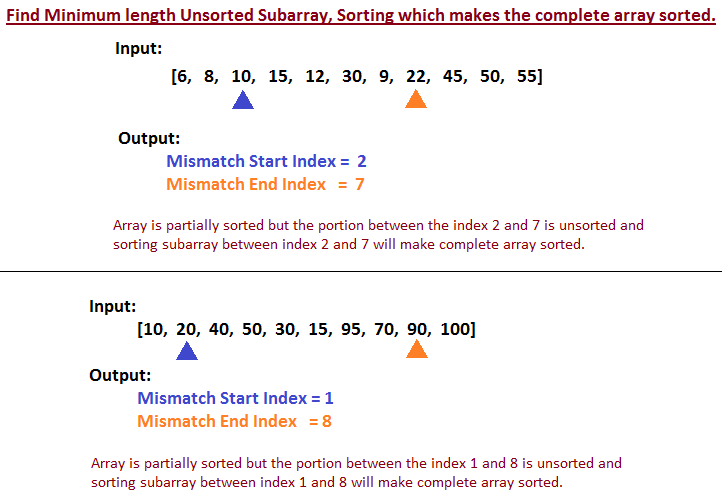
Find minimum unsorted subarray index m and n such that if you sort elements from m through n, then complete array would be sorted.

Let's understand the problem statement in simple words, 
Given an array of partially sorted integers, you have to find start index 'm' from where mismatch started that is the point from which array is not in sorted order,  and you have to find index 'n' till which index array is unsorted, and if you sort elements m through n, then entire array would be sorted.  

Let's see example to understand what is the input and expected output.

find smallest window in array sorting which will make entire array sorted
Find smallest window in array sorting which will make entire array sorted

Count trailing zeros in factorial of a number.

Count trailing zeros in factorial of a number.


Count trailing zeros in factorial of a number. there are many ways to count trailing 0 in factorial of number. Java program to count trailing zero.

What is Trailing Zero in a number?
Trailing zeros are a sequence of 0 in the decimal representation of a number, after which no other digits follow.

Example: 5! = 120
Number of Trailing Zero = 1

Example: 7! = 5040
Number of Trailing Zero = 1

Example: 10! = 3628800
Number of Trailing Zero = 2

Below you can get Factorial of number till 20 for testing Trailing Zeros in java program.
factorial of a number from 1 to 20 table
Count trailing zeros in factorial of a number

Swap two numbers In Java without using third variable.

Swap two numbers In Java without using third variable.


Swap two numbers In Java without using third variable. Write a program to swap/exchange 2 numbers without using temporary or third variable.

There are many approaches to solve this problem, we will see all of them one by one.


Factorial of number in Java

Factorial of number in Java.


Factorial of number in Java. Factorial of number is product of a number and all number below it. Example: 5! = 5 * 4 * 3 * 2 * 1 = 120.

Factorial of 3
3! = 3 * 2 * 1 = 120.

Note: The value of 0! is 1

Below you can get Factorial of number till 20.

When to use SOAP over REST Web Service. Is REST better than SOAP?

When to use SOAP over REST Web Service.
Is REST service better than SOAP service?
Difference between SOAP and REST Web Service. OR
SOAP Vs REST Web Service.


When to use SOAP over REST Web Service. Is REST service better than SOAP service. Benefits of SOAP over REST service. 
soap vs rest api
SOAP vs REST

Check Number is Palindrome in Java Program

Java Program to Check Number is Palindrome.


Java Program to Check Number is Palindrome. Number is called Palindrome, if the reverse of number is equal to original number. Example: 12321, 545.

In this post, we will see Algorithm to check whether number is palindrome or not.


Java Program to check whether Number is Palindrome or not.


It is very easy to check whether Number is Palindrome or not.

Approach 1:

In this approach, 
STEP 1: Reverse the original number.
STEP 2: Check, whether original number and reversed number is same. If Yes, then number is
               Palindrome otherwise not


 Lets understand above algorithm step by step with below example.


Java Program to Check number is Palindrome or not.
package com.javabypatel.string;

public class PalindromeCheck {
 public static void main(String[] args) {
  palindromCheck(12321);
 }

 private static void palindromCheck(int number){
  if(number < 0){
   System.out.println("Invalid number");
   return;
  }

  int temp = number;

  int reverseNumber = 0;
  while(number > 0){
   int mod = number % 10; //Get last digit of number 
   reverseNumber = (reverseNumber * 10) + mod;  //Append Last digit got to reverseNumber.
   number = number/10; //Get the remaining number except last digit.
  }

  if(temp == reverseNumber){
   System.out.println("Number is Palindrome");
  }else{
   System.out.println("Number is not Palindrome");
  }
 }
}


Approach 2:

STEP 1: Convert the Number to String by using String.valueOf() method.
STEP 2: Reverse the String.
STEP 3: Compare Reversed String with String we got in STEP 1, if both are same then Number is 
              Palindrome else not.

package com.javabypatel.string;

public class PalindromeCheck{  
 public static void main(String args[]){
  System.out.println(isPalindrome(12122));
 }  

 public static boolean isPalindrome(int number){
  if(number < 0){
   System.out.println("Invalid number");
   return false;
  }
  String originalString = String.valueOf(number);
  String reversedString = "";
  for (int i = originalString.length()-1; i >= 0; i--) {
   reversedString += originalString.charAt(i); 
  }

  return originalString.equals(reversedString);
 }
}


Approach 3:
In Approach 2, we reverse the whole String and then compared it with original string. 
In Approach 3, we will check whether string is palindrome without reversing original string and by comparing the characters of original string from both end that is from front and back together.

STEP: 1
Take 2 variable, pointer1 and pointer2. 
pointer1 initialise to index 0 and pointer2 initialise to originalString.length()-1.

STEP 2:
Compare characters at pointer1 and pointer2, if they are not same, then they are not Palindrome and stop. If they are same then increment pointer1, decrement pointer2.

STEP 3: Repeat STEP 2 til pointer1 < pointer2.
package com.javabypatel.string;

public class PalindromeCheck{  
 public static void main(String args[]){
  System.out.println(isPalindrome(1221));
 }  

 public static boolean isPalindrome(int number){
  if(number < 0){
   System.out.println("Invalid number");
   return false;
  }
  String originalString = String.valueOf(number);
  
  int pointer1 = 0;
  int pointer2 = originalString.length()-1;
  
  while(pointer1 < pointer2) {
   if(originalString.charAt(pointer1) != originalString.charAt(pointer2)) {
    return false;
   }
   pointer1++;
   pointer2--;
  }
  return true;
  
 }
}


I hope below diagram wil help you understand algorithm in better way. 


Approach 4:
In this approach, we compare first and last digit of a number, (example say 12321, so we compare first 1 and last 1). 
- If they are not same, return false,
- If they are same, remove first and last digit from the number(remaining number 232 ) and repeat the same steps again for remaining number.
package com.javabypatel.string;

public class PalindromeCheck{ 

    public static void main(String[] args) {
        int number = 12321;
        boolean result = checkPalindrome(number);
        System.out.println(result);
    }

    private static boolean checkPalindrome(int number) {
        int divisor = findDivisor(number);

        while (number != 0) {
            int lastDigit = number % 10;        //for 12321 % 10    -> last 1
            int firstDigit = number / divisor;  //for 12321 / 10000 -> first 1

            if (firstDigit != lastDigit) {
                return false;
            }

            number = number % divisor;          //for 12321 % 10000 -> remove first 1 from number = 2321
            number = number / 10;               //for 2321/10 -> remove last 1 from number = 232

            //we remove two numbers from 12321 and new number is 232, so we need to calculate new divisor
            //we remove two numbers so two zeros should be removed from divisor, so we can do divisor/100 to get
            //new divisor
            divisor = divisor / 100;

            //repeat the step for 232
        }
        return true;
    }

    private static int findDivisor(int number){
        int divisor = 1;

        // 12321/1 = 12321(it is >= 10), so 12321/10 = 1232, so 12321/100 = 123, so 12321/1000 = 12, so 12321/10000 = 1 end
        while (number / divisor >= 10) {
            divisor = divisor * 10;
        }
        return divisor;
    }
}

You may also like to see


Check whether String is Palindrome or Not in Java.

Count number of Bits to be flipped to convert A to B 

Count number of Set Bits in Integer. 

Check if number is Power of Two. 

Find all subsets of a set (Power Set). 

Skyline Problem in Java. 

Find Minimum length Unsorted Subarray, Sorting which makes the complete array sorted 

Count trailing zeros in factorial of a number 

When to use SOAP over REST Web Service. Is REST better than SOAP? 

Enjoy !!!! 

If you find any issue in post or face any error while implementing, Please comment.