Find overlapping interval among a given set of intervals.

Find overlapping interval among a given set of intervals.


Given a N pairs of intervals. Identify interval that overlap with other interval.

You are given a pair of intervals in a format (start time, end time), find interval that overlaps with other interval.

Example of overlapping intervals
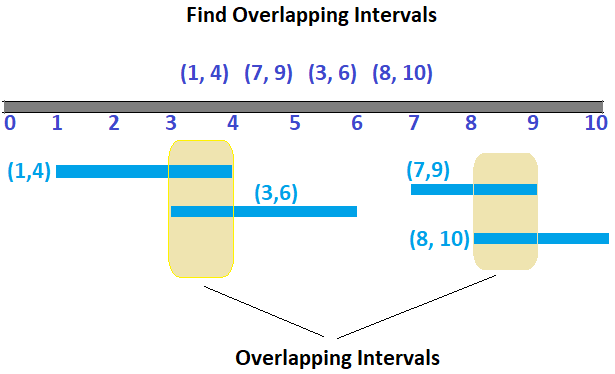
find overlapping time intervals

Let see some more input and output:

Example 1:
Input: (1, 3) (3, 5) (5, 7)
Output: No overlapping Intervals.

Example 2: (2, 3) (3, 5) (1, 6)
Output: (1, 6) overlaps with (2, 3)
Though (3, 5) also overlaps with (1, 6) we are mainly looking for one of them. Given solution below find one of them. 

Algorithm

Lets say we are given below time intervals

(1, 4), (7, 9), (3, 6), (8, 10)

If we sort the time intervals based on start time,

(1, 4), (3, 6), (7, 9), (8, 10)

If we see the first two interval, end time of first interval is greater than start time of second interval which means there is overlap of (end time - start time) in this case it is (4 - 3) = overlap of 1 unit.

Our task is to just find the overlapping intervals.

Java Program to find overlapping intervals among a given set of intervals.


package javabypatel;

import java.util.ArrayList;
import java.util.Arrays;
import java.util.Collections;
import java.util.List;

public class OverlappingIntervals {
    public static void main(String[] args) {
        List<Interval> intervals = Arrays.asList(
                new Interval(1, 3),
                new Interval(6, 8),
                new Interval(2, 4),
                new Interval(5, 6));
        List<Interval> interval = new OverlappingIntervals().findOverlappingIntervalApproach1(intervals);
        System.out.println("Overlapping intervals :" + interval);

        boolean isOverlappingIntervals = findOverlappingIntervalApproach2(intervals);
        System.out.println("Is overlapping intervals :" + isOverlappingIntervals);
    }

    //Sort the intervals by start time and compare the endtime of first interval with the start time of next interval.
    //If the endTime of first interval is > then startTime of next interval means there is overlap
    //Example: [(1, 3) (2, 4)]
    //time complexity: (n log n) + n = (n log n)
    public List<Interval> findOverlappingIntervalApproach1(List<Interval> intervals) {
        Collections.sort(intervals); //(n log n)
        List<Interval> overlappingInterval = new ArrayList<>();

        for (int i = 0; i < intervals.size()-1; i++) { //n
            if (intervals.get(i).endTime > intervals.get(i+1).startTime) {
                overlappingInterval.add(intervals.get(i));
                overlappingInterval.add(intervals.get(i+1));
            }
        }
        return overlappingInterval;
    }

    //Another approach which just says there is overlap or not.
    //time complexity:
    // O(n) = to find the max element in array
    // O(m) = where m is the max element in array
    // Total = O(m + n)
    // this approach works well when the range is small
    public static boolean findOverlappingIntervalApproach2(List<Interval> intervals){
        //find the highest end time within list of all intervals
        int highestTime = intervals.get(0).endTime;
        for (int i = 1; i<intervals.size(); i++) {
            int endTime = intervals.get(i).endTime;
            if(highestTime < endTime)
                highestTime = endTime;
        }

        int[] count = new int[highestTime + 1];
        //Mark the count[startTime] to +1 and count[endTime] to -1
        for (int i = 0; i<intervals.size(); i++) {
            Interval current = intervals.get(i);
            count[current.startTime]++;
            count[current.endTime]--;
        }

        //Iterate count array and sum the values
        //if at any point sum is > 1 that means interval overlaps.
        boolean isOverlappingIntervals = false;

        int sum = 0;
        for (int i = 0; i <count.length; i++) {
            sum += count[i];
            if(sum > 1){
                isOverlappingIntervals = true;
                break;
            }
        }

        return isOverlappingIntervals;
    }
}

Interval.java
package javabypatel;

public class Interval implements Comparable<Interval>{
    public int startTime;
    public int endTime;

    public Interval(int startTime, int endTime) {
        this.startTime = startTime;
        this.endTime = endTime;
    }

    @Override
    public int compareTo(Interval interval) {
        if (startTime < interval.startTime) {
            return -1;
        } else if (startTime == endTime) {
            return 0;
        } else {
            return 1;
        }
    }

    @Override
    public String toString() {
        return "Interval{" +
                "startTime=" + startTime +
                ", endTime=" + endTime +
                '}';
    }
}


Approach 2

In this approach, we are going to take a count array and for each given interval start time we will do count[startTime]++ and for end time, do count[endTime]--.

After filling the count array, iterate count array and do the sum of counts, If at any given index we find 
sum > 2 it means there is overlapping intervals. 

How this approach is working? say if we have intervals as (1, 3) and (2, 5), and count array for this will be. array size will be 5(highest end time in given intervals)
(1, 3) = [0, 1, 0, -1, 0,  0]
(2, 5) = [0, 1, 1, -1, 0, -1]

Whenever we see adjacent one's, it means there is y interval(in this case (2,5)) which has starting time before the end of x interval(1,3).
 

Serialize and Deserialize N-ary tree in Java

Serialize and Deserialize N-ary tree in java


This is a popular interview question asked in Tier-1 companies.

Given an n-ary tree, serialize and deserialize it.

Example of N-ary tree Serialization-Deserialization.

Serialize and Deserialize N-ary Tree

Algorithm


Serialization and Deserialization of N-ary tree is very similar to Serialization and Deserialization of Binary tree.

I would recommend to visit the Serialization/Deserialization post if not visited before: Serialize and Deserialize a Binary Tree

In Binary tree since there are only 2 child, we can get where is the start and end of the child of a particular Node from the serailized key, but in N-ary tree a Node can have n children, so we need some method to identify the start and end of a child nodes.

In this approach we will do a preorder traversal of N-ary tree and place the length of child nodes next to Node value as shown in example below,
 
serialize and deserialize n-ary tree implementation


In Deserialization process, it is exactly reverse now, we know first key in the String is the actual node and next key is the length of child nodes of a key.

Java Program to Serialize Deserialize N-ary tree


package javabypatel;

import java.util.ArrayList;
import java.util.Arrays;
import java.util.LinkedList;
import java.util.Queue;

public class SerializeDeserializeNAryTree {

    public static void main(String[] args) {
        NAryNode root = new NAryNode(1,
                Arrays.asList(
                        new NAryNode(2, Arrays.asList(
                                new NAryNode(5),
                                new NAryNode(6),
                                new NAryNode(7, Arrays.asList(
                                        new NAryNode(11),
                                        new NAryNode(12))))),
                        new NAryNode(3),
                        new NAryNode(4, Arrays.asList(
                                new NAryNode(8),
                                new NAryNode(9),
                                new NAryNode(10)))
                ));

        String str = serializeTree(root, new StringBuilder());
        System.out.println(str);
        NAryNode deserializeRoot1 = deserializeApproach1(str == null? null : str.split(","), new int[1]);
        NAryNode deserializeRoot2 = deserializeApproach2(str);

        System.out.println(deserializeRoot1);
        System.out.println(deserializeRoot2);
    }

    //In this approach, we need to take a separate index array of size 1 to remember the next element in array to pick
    //or we can take a static integer to remember the state.
    private static NAryNode deserializeApproach1(String[] arr, int[] index) {
        if (arr == null || index[0] >= arr.length || arr[index[0]] == null) {
            return null;
        }

        NAryNode n = new NAryNode(Integer.parseInt(arr[index[0]++]));
        int size = Integer.parseInt(arr[index[0]++]);
        n.child = new ArrayList<>(size);

        for (int i = 0; i < size; i++) {
            n.child.add(deserializeApproach1(arr, index));
        }
        return n;
    }

    //In this approach, we are converting serialized tree to Queue, so that when we do
    //queue.poll it will remove the element and we don't need to keep track of the next element to process.
    private static NAryNode deserializeApproach2(String str) {
        if (str == null) {
            return null;
        }
        return deserializeHelper(new LinkedList<String>(Arrays.asList(str.split(","))));
    }

    private static NAryNode deserializeHelper(Queue<String> queue) {
        if (queue.isEmpty()) {
            return null;
        }

        NAryNode n = new NAryNode(Integer.parseInt(queue.poll()));
        int size = Integer.parseInt(queue.poll());
        n.child = new ArrayList<>(size);

        for (int i = 0; i < size; i++) {
            n.child.add(deserializeHelper(queue));
        }
        return n;
    }

    private static String serializeTree(NAryNode root, StringBuilder sb) {
        if (root == null) {
            return null;
        }

        sb.append(root.data);
        sb.append(",");

        if (root.child != null) {
            sb.append(root.child.size());
            sb.append(",");
            for (int i = 0; i<root.child.size(); i++) {
                serializeTree(root.child.get(i), sb);
            }
        } else {
            sb.append(0);
            sb.append(",");
        }
        return sb.toString();
    }
}


NAryNode.java
package javabypatel;

import java.util.List;

public class NAryNode {
    public int data;
    public List<NAryNode> child;

    public NAryNode(int data, List<NAryNode> child) {
        this.data = data;
        this.child = child;
    }
    public NAryNode(int data) {
        this.data = data;
    }
}

N-ary tree preorder traversal in java

N-ary tree preorder traversal in java


This is a popular interview question asked in Tier-1 companies.

Given an n-ary tree, print preorder traversal of its nodes values.

Example of N-ary tree preorder traversal below:

n-ary tree preorder traversal example

Algorithm


Preorder traversal: To traverse a Binary Tree in Preorder, following operations are carried-out 
  1. Visit the root node and print data of that node. 
  2. Traverse the left subtree, and 
  3. Traverse the right subtree.

Preorder traversal of N-ary tree is very similar to that of Binary tree preorder traversal, only difference is instead of two children in Binary tree here we have N children.

Preorder traversal of Binary tree: Binary Tree Preorder Traversal

Considering the example above, 
we will first visit the root Node 1, then instead of directly going Left and then Right that is what we do in Binary tree preorder traversal because there is only 2 children, here we don't know the number of child, so what we are going to do is loop for all the child and then do a Preorder traversal for each child.
 
Visit Root Node 1
loop for all the children [Node 2, Node 3, Node 4]  (i = 0, i<3; i++) i=0

Visit Node 2, 
Iterate all its children [Node 5, Node 6, Node 7]  (i = 0, i<3; i++) i=0

Visit Node 5,
Iterate all its children []

Node 5 has no children so we came back to Node 2, now i = 1

Came back to Node 2, 
Iterate all its children [Node 5, Node 6, Node 7], (i = 0, i<3; i++), i =2 do for Node 6. 

and it continues.

Java Program to print N-ary tree preorder traversal


package javabypatel;

import java.util.Arrays;

public class NAryTreeTraversal {
    public static void main(String[] args) {
        NAryNode root = new NAryNode(1,
                Arrays.asList(
                        new NAryNode(2, Arrays.asList(
                                    new NAryNode(5),
                                    new NAryNode(6),
                                    new NAryNode(7, Arrays.asList(
                                                new NAryNode(11),
                                                new NAryNode(12))))),
                        new NAryNode(3),
                        new NAryNode(4, Arrays.asList(
                                    new NAryNode(8),
                                    new NAryNode(9),
                                    new NAryNode(10)))
                ));

        preOrderTraversal(root);
    }

    private static void preOrderTraversal(NAryNode start) {
        if (start == null) {
            return;
        }

        System.out.print(start.data + ",");
        if (start.child != null) {
            for (int i = 0; i < start.child.size(); i++) {
                preOrderTraversal(start.child.get(i));
            }
        }
    }
}

NAryNode.java
package javabypatel;

import java.util.List;

public class NAryNode {
    public int data;
    public List<NAryNode> child;

    public NAryNode(int data, List<NAryNode> child) {
        this.data = data;
        this.child = child;
    }
    public NAryNode(int data) {
        this.data = data;
    }
}

Minimum deletions required to make frequency of each letter unique in a String in Java

Minimum deletions to make frequency of each character unique


This is a popular interview question asked in Tier-1 companies.

Given a string, find the minimum number of characters to be deleted in a string so that the frequency of each character in the string is unique.

Question 1:
String s = 'aaaabbbcccdddd'
Frequency of characters : { a=4, b=3, c=3, d=4 }

a nd d both have same frequency 4, similarly b and c have same frequency 3. so frequency is repeated and we need to make it unique.
we need to delete three character from a, one characters from b to make their frequency different.
s = 'abbcccdddd'

Frequency of characters : { a=1, b=2, c=3, d=4 }

Detailed Description:
we need to make the frequency unique,
Either we need to delete one character from a or d so that we break the same frequency.
so we delete a, now string is "aaabbbcccdddd"

Now the frequency of a is 3, b is 3, c is 3 and d is 4
the frequency of a, b and c is repeating, we need to delete one character from a,
s = 'aabbbcccdddd'

Now the frequency of a is 2, b is 3, c is 3 and d is 4
the frequency of b and c is repeating, we need to delete one character from b, but this will make b count to 2 which will be same as a count, so we will delete 2 characters from b so the frequency will be 1.
s = 'aabcccdddd'

Now the frequency of a is 2, b is 1, c is 3 and d is 4, so is unique now.

Answer is 4 because we delete 4 characters to make the frequency unique.

Java Program to find minimum deletions in a String to make the frequency of each character unique


package javabypatel;

import java.util.Collections;
import java.util.HashMap;
import java.util.Map;
import java.util.PriorityQueue;

public class MinimumDeletionUsingPriorityQueue {
    public static void main(String[] args) {
        System.out.println(countFrequency("aaaabbbcccdddd"));
    }

    private static int countFrequency(String str) {

        if (str == null || str.length() < 2) {
            return 0;
        }

        //Taking a map to find unique occurrence of each character in a string.
        Map<Character, Integer> frequencyCount = new HashMap<>();
        for (char ch: str.toCharArray()) {
            int count = frequencyCount.getOrDefault(ch, 0);
            frequencyCount.put(ch, count + 1);
        }

        //Taking a PriorityQueue for processing the count of each occurrence of a character
        //Putting the values in reverse order so that higher counts are at head
        PriorityQueue<Integer> priorityQueue = new PriorityQueue<>(Collections.reverseOrder());

        //dumping the frequency of each characters in a Priority queue.
        for (Map.Entry<Character, Integer> entry : frequencyCount.entrySet()) {
            priorityQueue.add(entry.getValue());
        }

        int deletionCount = 0;

        while (!priorityQueue.isEmpty()) {
            int frequency = priorityQueue.poll();

            //If there is no element left after poll, It means we are done, return deletionCount.
            if (priorityQueue.size() == 0 ) {
                return deletionCount;
            }

            //Here we are comparing the polled count with the count at the head. since our PriorityQueue is in reverse order
            //Counts that are same will be grouped together. So idea is to check polled and peek and if they are same it means we
            //need to delete one occurrence of a character to make it unique, but the catch is after deletion, the count which we encountered
            //may also be the occurrence count of other character present in a queue, so we have to repeat this process.
            //number of time we delete the occurrence, we add that in our deletionCount.
            if (frequency == priorityQueue.peek()) {
                //it means we have to delete one character to make the frequency unique
                priorityQueue.add(frequency-1);

                //Number of time we delete the character to make frequency unique, we have to increase the deletionCount.
                deletionCount ++;
            }
        }
        return deletionCount;
    }
}

Find longest binary gap in binary representation of integer number.

Find longest length bi-valued slice in an array in java


This is a popular interview question asked in Tier-1 companies.

You are given a positive integer n, find the longest distance between two consecutive 1's in the binary representation of n.

Example:
1. Input: 9
Output: 2
9 binary representation is 1001 and there are two 0 in between 1's. so answer is 2

2. Input: 1041
Output: 5
1041 binary representation is 10000010001 and there are 5 consecutive 0's in first gap and 3 consecutive 0's in second binary gap. so answer is 5 as the highest gap among both.

3. Input: 15
Output: 0
15 binary representation is 1111 and there are no 0's in between 1's. so answer is 0

4. Input: 20
Output: 10
20 binary representation is 10100 and contains only one 0 in between 1's. so answer is 1

Algorithm


we will take 3 variables 
maxGap: for storing the result
tempGap: for storing temporary gap
oneFlag: a flag for indication that we have encountered 1 before or not.

Example: 101001, in this example when we encounter first binary gap of size 1 which would be in tempGap but later we encountered another binary gap of size 2 which is higher than before, so we need to store previous value of tempGap, that is where maxGap will be used to store whichever is highest among previous binary gaps.

Java Program to find longest binary gap in binary representation of an integer number.


package javabypatel;

public class BinaryGap {
    public static void main(String[] args) {
        System.out.println(new BinaryGap().findLongestBinaryGap(20));
    }

    public int findLongestBinaryGap(int number) {
        int maxGap = 0;
        int tempGap = 0;
        boolean oneFlag = false;

        while (number > 0) {
            int remainder = number % 2;
            number = number / 2;
            System.out.print(remainder);
            if (oneFlag) {
                if (remainder == 1) {
                    maxGap = Math.max(tempGap, maxGap);
                    tempGap = 0;
                } else {
                    tempGap ++;
                }
            } else if (remainder == 1) {
                oneFlag = true;
            }
        }
        System.out.println();
        return maxGap;
    }
}

Find longest length bi-valued slice in an array

Find longest length bi-valued slice in an array in java


This is a popular interview question asked in Tier-1 companies.

You are given a sequence of n integers and the task is to find the maximum slice of the array which contains no more than two different numbers.

Example:
1. Input: [1, 2, 1, 2, 2, 3, 3, 2, 3]
Output: 6
Max slice is [2, 2, 3, 3, 2, 3] which contains only two numbers 2 and 3 and the length is 6 

2. Input: [1, 2, 3]
Output: 2
Max slice is either [1, 2] or [2, 3] which contains only two numbers and the length is 2

3. Input: [1, 4, 4, 1, 4]
Output: 5 
Max slice is whole array which contains only two numbers 1 and 4 and the length is 5

4. Input: [2]
Output: 1 
Max slice is whole array which contains only one number 2 and the length is 1

Algorithm


As we are looking for bi-value slice, we will keep two pointer lastSeen and secondLastSeen which keep track of the numbers we last read.

So if the current number we are reading is one of the number we read before that is it is same as either lastSeen or secondLastSeen, then we can increase our longest bi-value slice counter(say tempCounter) by 1

So we have three variables till now, lastSeen, secondLastSeen and tempCounter to store the current longest bi-value slice.


Consider the array [121223323]

say we read 1212and we were good at that point, now we read element 3, so in that case new series has started but including the current number 3 we can include the previous two 2's in this series that is starting from index 3.

So instead of going back and see the last repeated number, we will keep track of this in the separate variable lastSeenNumberRepeatedCount which holds the number of times last seen value repeated in this case lastSeenNumberRepeatedCount would be 2, because when we encountered 3 at index 5, the number before 3 is 2 which first occur at index 3 and then the same number repeated that is lastSeen number repeated at index 4 so making lastSeenNumberRepeatedCount to 2.

So when we encounter 3 at index 5, we directly add the lastSeenNumberRepeatedCount to our tempCounter so it would be lastSeenNumberRepeatedCount + 1 (added 1 because starting from 3 new series has started, so including the current number 3)

So we have four variables till now, lastSeen, secondLastSeen, tempCounter and lastSeenNumberRepeatedCount.

We also need one more variable for storing our longest bi-valued slice as tempCounter will change when new series starts so what about the previous value of tempCounter which was our last longest bi-value slice till that point.

So we have five variables till now, lastSeen, secondLastSeen, tempCounter, lastSeenNumberRepeatedCount and lbs for storing result.

Java Program to find largest bi-valued slice in an array


package javabypatel;

public class LongestBiValueSlice {
    public static void main(String[] args) {
        System.out.println(new LongestBiValueSlice().getLongestSlice(new int[]{2}));
    }

    public int getLongestSlice(int[] arr) {
        int lastSeen = -1;
        int secondLastSeen = -1;
        int lbs = 0;
        int tempCount = 0;
        int lastSeenNumberRepeatedCount = 0;

        for (int current : arr) {
            if (current == lastSeen || current == secondLastSeen) {
                tempCount ++;
            } else {
                // if the current number is not in our read list it means new series has started, tempCounter value in this case will be
                // how many times lastSeen number repeated before this new number encountered + 1 for current number.
                tempCount = lastSeenNumberRepeatedCount + 1;
            }

            if (current == lastSeen) {
                lastSeenNumberRepeatedCount++;
            } else {
                lastSeenNumberRepeatedCount = 1;

                secondLastSeen = lastSeen;
                lastSeen = current;
            }

            lbs = Math.max(tempCount, lbs);
        }
        return lbs;
    }
}

Custom BlockingQueue implementation in java

Producer Consumer using custom BlockingQueue implementation in java


Implement a custom Blocking Queue is very popular interview question.

What is Blocking Queue?

BlockingQueue is a queue data structure that blocks all the threads trying to read(Consumer) the data from the queue if the queue is empty and similarly it blocks all the threads trying to add(Producer) the data to the queue if the queue is full. due to this blocking feature, the queue is known as BlockingQueue. 

Threads that are blocked for adding the data to the queue due to queue full gets unblocked when some other thread removes the data from the queue and there is a space to add new data.

Threads that are blocked for reading the data from the queue due to queue empty gets unblocked when some other thread adds the data to the queue and there is some data to read.

Note: BlockingQueue doesn't accept null values, If we try to add null, then it throws NullPointerException.
Custom BlockingQueue implementation in java

I would recommend going through below articles for better understanding of Threads and synchronization in Java.


Implement Custom BlockingQueue in Java


package javabypatel;

import java.util.concurrent.locks.Condition;
import java.util.concurrent.locks.Lock;
import java.util.concurrent.locks.ReentrantLock;

public class CustomBlockingQueueUsingLock {
    private Lock lock = new ReentrantLock();
    private Condition putCondition = lock.newCondition();
    private Condition takeCondition = lock.newCondition();

    private Object[] queue;
    private int queueSize;

    private int putIndex;
    private int takeIndex;
    private int count;

    public CustomBlockingQueueUsingLock(int queueSize) {
        this.queueSize = queueSize;
        queue = new Object[queueSize];
    }

    public void put(Object data) {
        lock.lock();
        try{
            while (count >= queueSize) {
                try {
                    putCondition.await();
                } catch (InterruptedException e) {
                    e.printStackTrace();
                }
            }
            System.out.println("Queuing value :" + data);
            queue[putIndex] = data;
            count++;

            if (++putIndex >= queueSize) {
                putIndex = 0;
            }
            takeCondition.signalAll();
        }  finally {
            lock.unlock();
        }
    }

    public Object take() {
        lock.lock();
        try {
            while (count == 0) {
                try {
                    takeCondition.await();
                } catch (InterruptedException e) {
                    e.printStackTrace();
                }
            }
            Object data = queue[takeIndex];
            count--;

            if (++takeIndex >= queueSize) {
                takeIndex = 0;
            }
            putCondition.signalAll();
            return data;
        } finally {
            lock.unlock();
        }
    }

    public static void main(String[] args) {
        CustomBlockingQueueUsingLock customBlockingQueue = new CustomBlockingQueueUsingLock(5);

        new Thread(() -> {
            int i = 0;
            while (i < 10) {
                System.out.println("data :" + customBlockingQueue.take());
                i++;
            }
        }, "Consumer Thread").start();

        new Thread(() -> {
            int i = 0;
            while (i < 10) {
                customBlockingQueue.put(i);
                i++;
            }
        }, "Producer Thread").start();
    }
}
 

Implement Custom Generic blocking queue using Linked list data structure and Locks in Java


package javabypatel;

import java.util.LinkedList;
import java.util.Queue;
import java.util.concurrent.locks.Condition;
import java.util.concurrent.locks.Lock;
import java.util.concurrent.locks.ReentrantLock;

public class GenericCustomBlockingQueueUsingLock<T> {
    private Queue<T> queue = new LinkedList<T>();

    private Lock lock = new ReentrantLock();
    private Condition putCondition = lock.newCondition();
    private Condition takeCondition = lock.newCondition();

    private int size;

    public GenericCustomBlockingQueueUsingLock(int size) {
        this.size = size;
    }

    public T take() throws InterruptedException {
        lock.lock();
        try {
            while (queue.isEmpty()) {
                takeCondition.await();
            }
            T data = queue.poll();

            //If say the queue is full before we take, then chances are threads trying to put would be waiting, so after taking the
            //element we will inform put threads that there is space now for you to put.
            putCondition.signal();
            return data;
        } finally {
            lock.unlock();
        }
    }

    public void put(T obj) throws InterruptedException {
        lock.lock();
        try {
            while (queue.size() == size) {
                putCondition.await();
            }
            System.out.println("Putting data :" + obj);
            queue.add(obj);

            //If say the queue is empty before we add the element to the queue, then chances are threads trying to take the element would be waiting,
            //so after adding the element we will inform take threads that there is element now for you to take.
            takeCondition.signal();
        } finally {
            lock.unlock();
        }
    }

    public static void main(String[] args) {
        GenericCustomBlockingQueueUsingLock<Integer> queue = new GenericCustomBlockingQueueUsingLock<>(10);
        new Thread(() -> {
            int i = 0;
            while (i < 20) {
                try {
                    System.out.println(queue.take());
                } catch (InterruptedException e) {
                    e.printStackTrace();
                }
                i++;
            }
        }).start();

        new Thread(() -> {
            int i = 0;
            while (i < 20) {
                try {
                    queue.put(i);
                } catch (InterruptedException e) {
                    e.printStackTrace();
                }
                i++;
            }
        }).start();
    }
}

When to use volatile vs synchronized in Java

When to use volatile vs synchronized in Java


When to use volatile and synchronized keyword in Java is very important to understand as without the understanding you may go wrong in communicating between threads.


synchronized keyword:

synchronized keyword is used at method level and block level, but the whole purpose of synchronized keyword is to apply access restrictions as only one thread holding the monitor would be able to execute the code inside synchronized method/block.

volatile keyword:

Volatile keyword is used when you don't want local CPU core to cache the variable from main memory, instead all read/write to volatile variable should happen directly from main memory.

The Java volatile keyword guarantees visibility of changes to variables across threads.

So lets understand with practical scenario when to use which,

Scenario 1:
If multiple threads are trying to read the value of a variable and based on the current value it takes the decision of incrementing or decrementing a variable value, is marking a variable volatile in this situation enough?

No, Volatile only guarantees visibility, check and act is like we want two operations to be atomic in that case we either need to use synchronized method/block or Atomic variables (AtomicInteger for example).

Scenario 2:
There are multiple threads reading the value of shared variable but only one thread is writing to a shared variable, is marking a variable volatile in this situation enough?

Yes. as is there no situation where we need more than one operation to be atomic here and also only one thread is writing to a variable others are simply reading the shared variable, so volatile variable should work.

So to summarize, there are 3 problems associated with Multithreading,
  1. Race Conditions. (check and act, like i++, i--)
  2. Local CPU Caching OR Stale memory. (Threads running in CPU, caches the value from main memory to local CPU cache and now main memory and local CPU cache is out of sync)
  3. Complier and CPU optimization (VM/CPU are free from reordering the instructions in the program for optimization and performance as long as the meaning of the instructions remain same.)

Volatile helps in resolving the problem happens due to point 2 and 3 but not 1.

Synchronization helps in resolving all of the above points.

Example demonstrating need of volatile keyword in Java

package javabypatel;

public class VolatileExample extends Thread {

    //Remove the volatile keyword and see
    volatile boolean keepRunningFlag = true;

    public void run() {
        System.out.println("Volatile thread running");
        long counter = 0;
        while (keepRunningFlag) {
            counter++;
        }
        System.out.println("Volatile thread terminated." + counter);
    }

    public static void main(String[] args) throws InterruptedException {
        //Code below is executing under Main Thread
        VolatileExample volatileThread = new VolatileExample();
        volatileThread.start();

        Thread.sleep(1000);

        //Main Thread is changing the value of keepRunningFlag to false. Ideally after this changes,
        //volatileThread created above executing the run method should come out of the while loop,
        //but if you don't declare the variable keepRunningFlag as volatile then there is no guarantee when while loop will break.
        //How this works internally without volatile keyword,
        //Main thread say running in CPU core 1 updates the keepRunningFlag to false which is updated in Main thread CPU cache
        //volatileThread say running in CPU core 2 also has local CPU cache which before starting the thread had cached the variable
        //keepRunningFlag to its local cache as false.
        //So any updates on the local variable not marked as volatile will first get updated to its local CPU cache.
        //No when the local cache value will sync with Main memory is internal to CPU and that is where problem happens.
        //When we mark the variable as volatile, we are instructing CPU as not to read/write the value of this variable to
        //your local cache, instead directly read/write from main memory.
        volatileThread.keepRunningFlag = false;

        System.out.println("Main thread ended, keepRunningFlag = " + volatileThread.keepRunningFlag);
    }
}


Check the program below, what do you think we should use volatile or synchronization in below situation

package javabypatel;

public class DBConnection {
    private boolean connected;

    public synchronized void setConnectionFlag(boolean connected) {
        this.connected = connected;
    }
    public synchronized boolean isConnected() {
        return connected;
    }
}
Think of synchronized keyword when you want to make more than one instruction to be marked as single unit that is Atomic operation.

Example: i++ where the operation is break down as,
1. Reading the value of i first
2. Incrementing the value of i.

So that is two step operation and you want to make this two step as a single Atomic operation.

Think of volatile when you want to resolve the issues of visibility, like updates from one thread should be immediately available to other thread for taking some action but there is no operation that you want to execute as atomic, like the example above. In the above example we are simply setting the value of connected in setConnectionFlag method and we are simply returning the value of connected variable in isConnected method, so better to mark the connected variable as volatile in this situation instead of marking the method as synchronized.

Remember whatever you could do with volatile keyword can also be done using synchronized but with synchronized keyword you also get the feature of making the multi step instructions as Atomic operation.

Using synchronized and volatile keyword together.

There may be a situation where you may need to use volatile and synchronized keyword together. In the example below we are using for the reason of performance.

package javabypatel;

public class SingletonTest {
    volatile static SingletonTest instance = null;

    public static SingletonTest getInstance() {
        if (instance == null) {
            synchronized (SingletonTest.class) {
                if (instance == null) {
                    instance = new SingletonTest();
                    System.out.println("instance created");
                }
            }
        }
        return instance;
    }
}

In the example above since the outer line "if (instance == null)" is not inside synchronized block, what will happen is, say if Thread A gets a chance and is executing the line "instance = new SingletonTest();" and after that it gets preempted. Now, what will Thread 2 see which reached the line "if (instance == null) {" outside the synchronized block, whether the instance would be null or non-null. possibly it may see null if the local cache of the thread 1 is not flushed. so to make sure Thread 2 see the update value of the instance variable instance is marked as volatile here.

You may also like to see


How ConcurrentHashMap works and ConcurrentHashMap interview questions.

How Thread.join() in Java works internally

Exception Handling Interview Question-Answer

Method Overloading - Method Hiding Interview Question-Answer

Type Casting Interview Questions In Java

How is ambiguous overloaded method call resolved in java

Method Overriding rules in Java

Interface interview questions and answers in Java

Enjoy !!!! 

If you find any issue in post or face any error while implementing, Please comment.

How Recursion works in Java with example

How Recursion works internally in Java


In this post, we will see, how recursion works internally in java with example along with recursive function practice programs in Java.
We will also see, how Stackoverflow error is caused in Recursive functions.

What is Recursion?
Recursion is a process in which a function gets called repeatedly, either directly called by the same method or via other method call and such a method is called Recursive function.

To keep it simple, I would say, when a function calls itself is called recursion or a recursive call. Let's understand recursive function with a small example,

What is Base condition in recursion?
We have seen in recursion a function calls itself, now if the function keep calling itself recursively then how the control is going to come out, that is where a Base condition helps. Base condition is a necessary check to break the recursive call at some point.

Which data structure is used internally in recursion?
Stack data structure is used in recursion for storing the state of each function call.

Explain the use of stack in recursion?
let us first understand why we need data structure in recursion. check below program to find factorial using recursion in java
 
private static int findFactorialRecursive(int num){
   if(num < 0) {
     return -1;
   }
   if(num == 1 || num == 0) {
     return 1;
   }
   num = num * factRecursive(num-1); //Recursive call
   return num; 
}

When above function is invoked for the first time, method would be executed till line number 8, and post that it would jump back to line number 1 for a fresh method call with a new value of “num”.

If a function will execute again(second time) with new value of num, what about the value of previous num as it still has to execute line number 9 of the first call and has to preserve the value of num( basically it has to preserve state of first method call, then second call, then third call and so on).
So when a function calls itself, Stack is used to store the state of previous call.

Lets understand how recursion works internally with recursive call stack diagram.
recursive call stack diagram
Recursive call stack diagram

Recursion practice programs with solution
List of recursive practice programs, some of the recursive programs are tricky, read the complete solution to understand it better.
  1. Factorial of Number using Recursion in Java
  2. How to Reverse Word in Java Recursively
  3. Find Power of a Number using Recursion in Java
  4. Reverse String in Java using Recursion
  5. Tower Of Hanoi Recursive solution
  6. Implement Queue using Stack - Recursion.
  7. Reverse linked list using recursion in Java
  8. Print Linked List In Reverse Order using Recursion in Java
  9. Print Matrix in Spiral order using Recursion
  10. Fibonacci series in java using recursion
  11. Find Power of a Number using Recursion in Java

When Stackoverflow error is caused by recursive function?

In recursion, a method calls itself and a Stack data structure is used internally to store the state of each function call.

So as long as the function keep calling itself, Stack memory needs to be allocated for each function call.

Consider a situation where a program never hits the base condition then function will keep calling itself and Stack memory consumption will keep on increasing and at one point when there would be no Stack memory left to allocate for the next function call at that time Stackoverflow error would be thrown.

You may also like to see


Command Design Pattern

Observer Design Pattern

Adapter Design Pattern

Decorator Design Pattern

Enjoy !!!! 
If you find any issue in post or face any error while implementing, Please comment.

When to use Builder design pattern.

Builder Design Pattern.


Builder Design pattern is used to simplify the creation of complex Immutable object.

In simple words, we should use builder design pattern when a class have multiple properties, some of which are optional and some mandatory for an object creation that is constructor or static factories of such a class would require more than 4 to 5 parameters.
Builder design pattern in java
When to use Builder Design Pattern

Purpose of the Builder Design Pattern


Consider a class with multiple fields, Example: Pizza, Burger, Assembled Car, Computer etc, object creation of such class(Pizza) is complex due to multiple constructors required with some mandatory fields(like pizza size, bread type) and some optional(like pizza toppings cheese, olive, pepper etc).

Problem without Builder Pattern, 

Approach 1: Telescoping Constructor

For creating a object of such complex classes, it would require multiple constructors(Telescoping Constructor) each taking mandatory parameters with a new optional parameter as shown below,

public Pizza (int size, boolean cheese){ ... }
public Pizza (int size, boolean cheese, boolean olive){ ... } 
public Pizza (int size, boolean cheese, boolean olive, boolean pepper){ ... } 
public Pizza (int size, boolean cheese, boolean olive, boolean pepper, boolean onion){ ... }
Telescoping Constructor: A class with many constructors, where each constructor calls a more specific constructor in the hierarchy, which has more parameters than itself, providing default values for the extra parameters. The next constructor does the same until there is no left.
Problem: We can use Telescoping constructors in this situation but a problem with this pattern is that once constructors start taking more than 4 to 5 parameters, It becomes difficult to maintain and remember the required order of the parameters, also it brings more complexity for the caller of the constructor as which one to call in a given situation.

Approach 2: Setter method

One way of creating the object is to use setter method approach to set the properties of object step by step.
Pizza pizza = new Pizza(6);
pizza.setCheese(true);
pizza.setOlive(true);
pizza.setPepper(true);

Problem: we cannot use setter method approach here because with setter method, object could be modify after it is created using setter call and would no longer remain immutable.

Builder Pattern in Rescue

To avoid above problems in a situation where we have complex constructor, large number of parameters and need object Immutability, we use builder design pattern which separates the construction of a complex object from its representation.

Pizza.java
package javabypatel;

public class Pizza {
    private int size;
    private BreadType breadType;

    private boolean cheese;
    private boolean olive;
    private boolean pepper;

    public Pizza (PizzaBuilder pizzaBuilder) {
        this.size = pizzaBuilder.size;
        this.breadType = pizzaBuilder.breadType;

        this.cheese = pizzaBuilder.cheese;
        this.olive = pizzaBuilder.olive;
        this.pepper = pizzaBuilder.pepper;
    }

    public static class PizzaBuilder {
        //Mandatory Parameters
        private int size;
        private BreadType breadType;

        //Optional Parameters
        private boolean cheese;
        private boolean olive;
        private boolean pepper;

        public PizzaBuilder(int size, BreadType breadType) {
            this.size = size;
            this.breadType = breadType;
        }

        public PizzaBuilder withCheese(boolean cheese) {
            this.cheese = cheese;
            return this;
        }
        public PizzaBuilder withOlive(boolean olive) {
            this.olive = olive;
            return this;
        }
        public PizzaBuilder withPepper(boolean pepper) {
            this.pepper = pepper;
            return this;
        }

        public Pizza build() {
            return new Pizza(this);
        }
    }
}

enum BreadType {
    THIN_CRUST,
    THICK_CRUST,
    FLAT_BREAD;
}

class Main {
    public static void main(String[] args) {
        Pizza pizza = new Pizza.PizzaBuilder(6, BreadType.THICK_CRUST)
                .withCheese(true)
                .withOlive(true)
                .build();
        System.out.println(pizza);
    }
}

Advantages of Builder Design Pattern


1. Complex object construction become more readable and easy.
2. No need to pass optional parameters in creating the object.

Disadvantages of Builder Design Pattern


1. Builder pattern requires creating a separate Builder class for each different Type.
2. It creates more code.

Builder Design Pattern used in JDK API.


java.lang.StringBuilder class is a Builder for String class. 
String str = new StringBuilder("Hello").appeend("world").toString();

You may also like to see


Command Design Pattern

Observer Design Pattern

Adapter Design Pattern

Decorator Design Pattern

Enjoy !!!! 
If you find any issue in post or face any error while implementing, Please comment.